
Reviewing Submissions (with first-cut feedback)
Learning Pathway:
AI 201: ChatGPT in Everyday Tasks
24 June 2026
Learn how to build a Skill that gives staff first-cut feedback on their submissions.
Why this matters
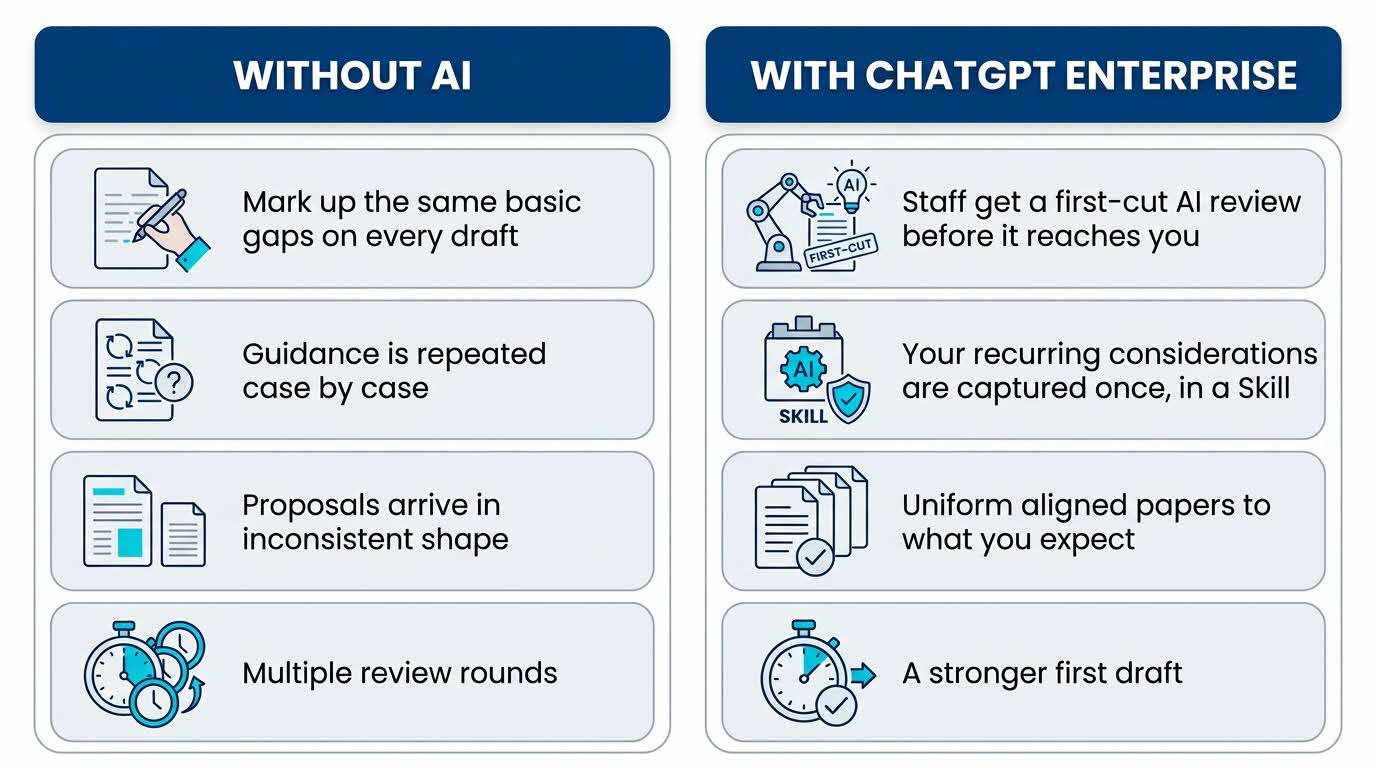
Another day, another submission, but largely similar feedback. Is the ask clear? Is the case strong? Are the risks covered? Repeating these comments on every submission is a drain. A custom AI reviewer could help capture your usual considerations for staff to run their drafts through before they reach you. Draft submissions would be closer to what you're looking for, so that you spend your time on judgment, instead of addressing basic gaps.
Your five-part recipe - C.R.A.F.T.
Use this structure to guide your thinking. Every effective AI task is built around five components — together, they spell CRAFT:
C | 📂 Context | Your personal priorities, considerations and preferences as they pertains to submissions. |
R | 🎭Role (who the AI should act as) | A submission reviewer, operating with your preferred parameters. |
A | ⚡Action (what the AI needs to do) | Check each submission draft to ensure that all the necessary elements have been incorporated, and any editorial errors have been corrected. |
F | 📋Format | Detailed review of the draft, with key areas requiring intervention flagged for correction. |
T | 🔍Test | Ensure that the reviewer managed to pick out all the areas requiring further intervention. |
Here’s what you need for this exercise:
Tools and inputs required
🛠️ Tool | ChatGPT Enterprise (WOG) |
🔗 Feature | File Upload |
📂 Your input | Example of a Submission with your feedback, preferences, priorities reflected. |
Step-by-step guide
Step 1: Open a new chat and paste the sample prompt found below. Don't send it yet. We still need to paste in the sample submission in Step 2.
Use this sample prompt (but don't send it yet):
Create a Skill that gives first-cut feedback on staff submissions and proposals that I paste into the chat. For each submission, check: Is the decision being sought clear? Is the case well-evidenced? Are the risks and mitigations credible? Is resourcing addressed? What is missing before it is ready for my decision? Ask me any questions to capture my own priorities. Here is a typical submission so you understand the format — calibrate your feedback to this kind of paper: [paste the sample submission below].
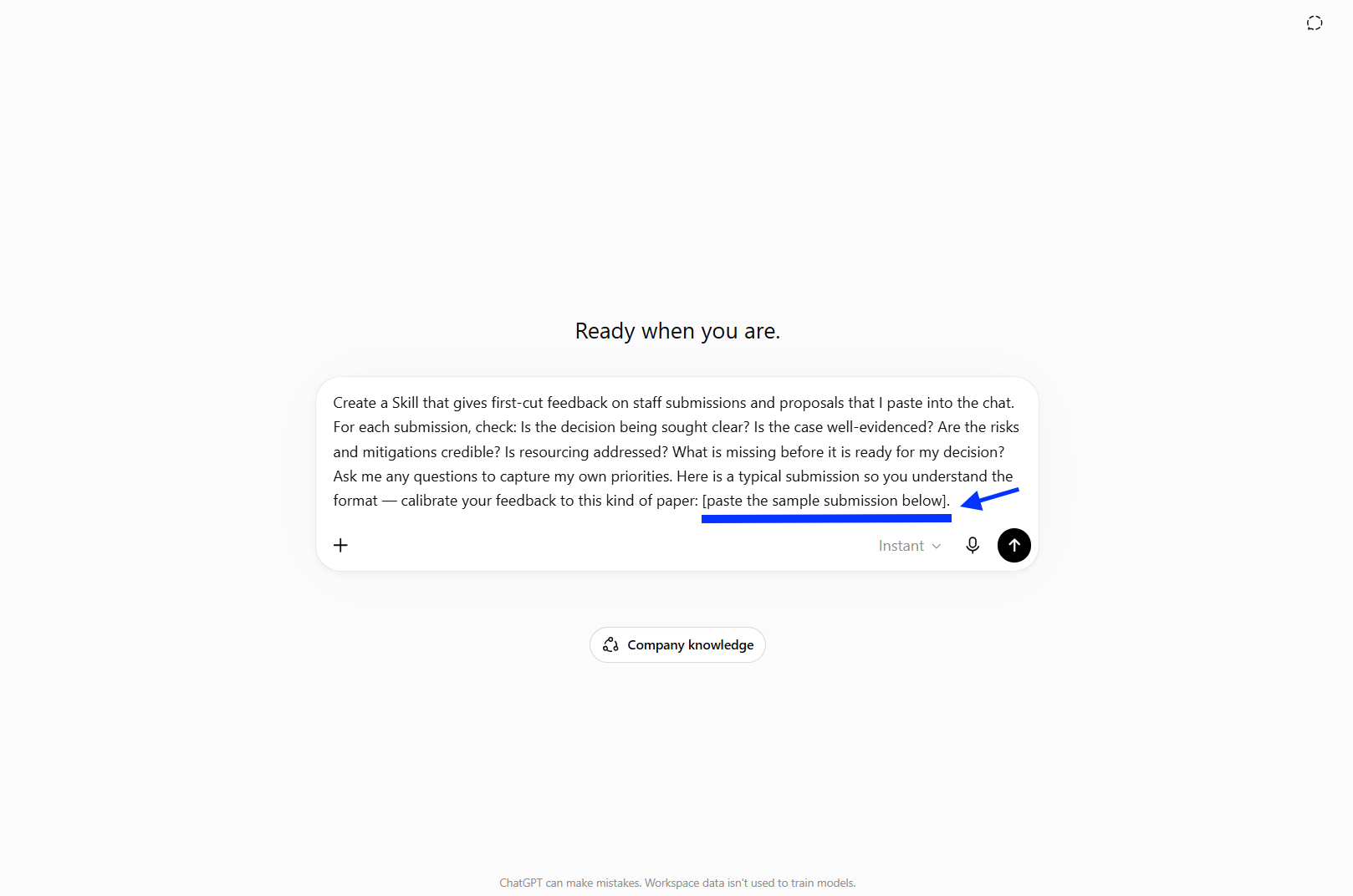
Open a new chat and paste the prompt. Don't send it yet, we still need to paste in the sample submission.
Step 2: Add the sample submission. Directly below the prompt, paste the sample submission so ChatGPT learns the format and calibrates its feedback, then send the whole message.
Note: This is a fictional sample submission. In order to produce an authentic demonstration, we incorporated simulated pressures—balancing operational stability against flexibility, objectivity, assessment, and potential hazards—to provide the evaluator with substantive points for inquiry.
Use this sample submission
[FOR APPROVAL] PILOT OF REVISED FLEXIBLE WORK ARRANGEMENT GUIDELINES FOR FRONTLINE OFFICERS
We seek PS's approval to pilot revised Flexible Work Arrangement (FWA) guidelines for frontline officers in the Operations Branch, with a view to a ministry-wide rollout by Q1 2026 if the pilot is successful.
Background
The current FWA guidelines were last updated in 2019. A staff engagement exercise conducted in February 2025 found that 68% of frontline officers felt the guidelines were unclear or inconsistently applied. There is a need to update and clarify the guidelines before extending them more broadly.
Assessment
Human Capital Division (HCD) proposes a three-month pilot from June to August 2025, covering 120 officers across two divisions. The pilot will test three models: compressed work weeks, staggered hours, and partial remote work for eligible roles. Division Heads have agreed to a minimum staffing threshold of 70% physical presence during core hours to ensure operational continuity.
The main risk is inconsistent interpretation of the guidelines by supervisors. HCD will conduct a briefing for all supervisors before the pilot begins to address this. HCD is also aware that officers in non-participating divisions may develop expectations about their own eligibility; a communication plan will be put in place to manage this.
No additional budget is required. All costs will be absorbed within existing headcount and operating expenditure.
Recommendation
HCD recommends that PS approve the three-month pilot of revised FWA guidelines for frontline officers in the Operations Branch from June to August 2025. Subject to a satisfactory review of the pilot outcomes, HCD will propose a ministry-wide rollout by Q1 2026.
![paste in the sample submission into the prompt too]](https://isomer-user-content.by.gov.sg/543/b0bd7fa3-d0a9-44e6-827c-494eed3399e8/1_RefineSamplePrompt.png)
paste in the sample submission into the prompt too
Step 3: Answer ChatGPT's questions, then build and install. ChatGPT will reply with a set of clarifying questions to calibrate the Skill to your priorities.
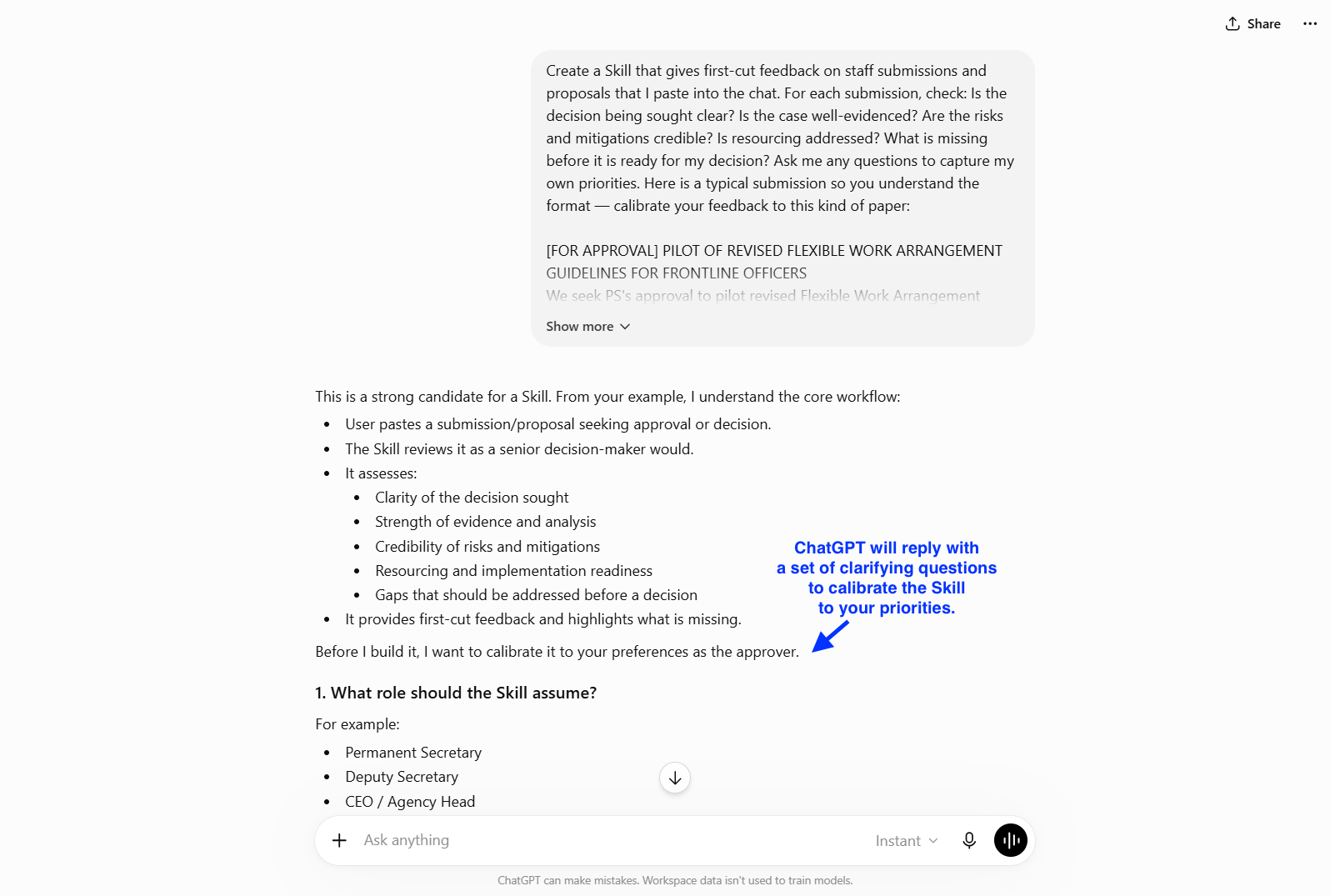
Treat this as a conversation, not a form. This means iterating with it by answering in your own words. You don't need to answer every question or every sub-option. Just make sure your answers capture what you actually care about when reviewing a paper e.g. the role it should take, how tough the review should be, and the gaps you most want flagged. ChatGPT will fill in sensible defaults for anything you skip, and you can refine the Skill later.
Here is an example of how you might answer, calibrated to the sample paper:
Use this sample prompt
Permanent Secretary. The papers I review are action-for-approval submissions addressed to PS, like the sample.
Decision-ready. Assume the paper could reach a senior decision-maker tomorrow, and surface anything that would cause approval to be deferred. Keep the delivery constructive so staff can act on it, but don't soften the gaps.
In addition to the checks I already listed, give explicit attention to: stakeholder support and consultation, operational feasibility, value for money, measurement of outcomes/KPIs, and whether alternative options were considered.
Use an executive-review format: Decision sought / Key strengths / Key concerns / Missing information / Questions for staff / Recommendation on readiness.
Yes — include an overall readiness rating: Ready for decision / Ready with minor revisions / Requires significant strengthening / Not decision-ready.
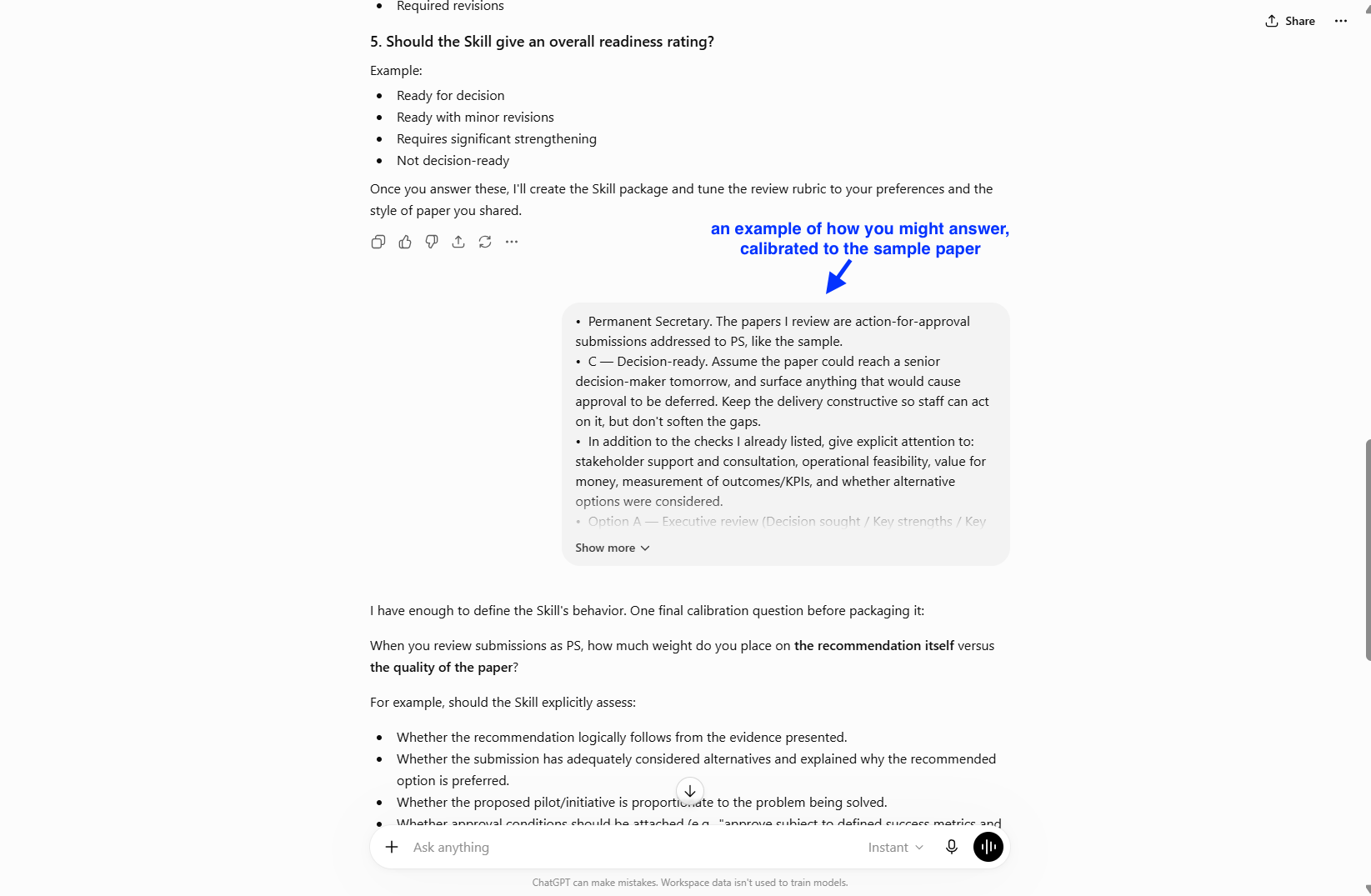
Answer ChatGPT
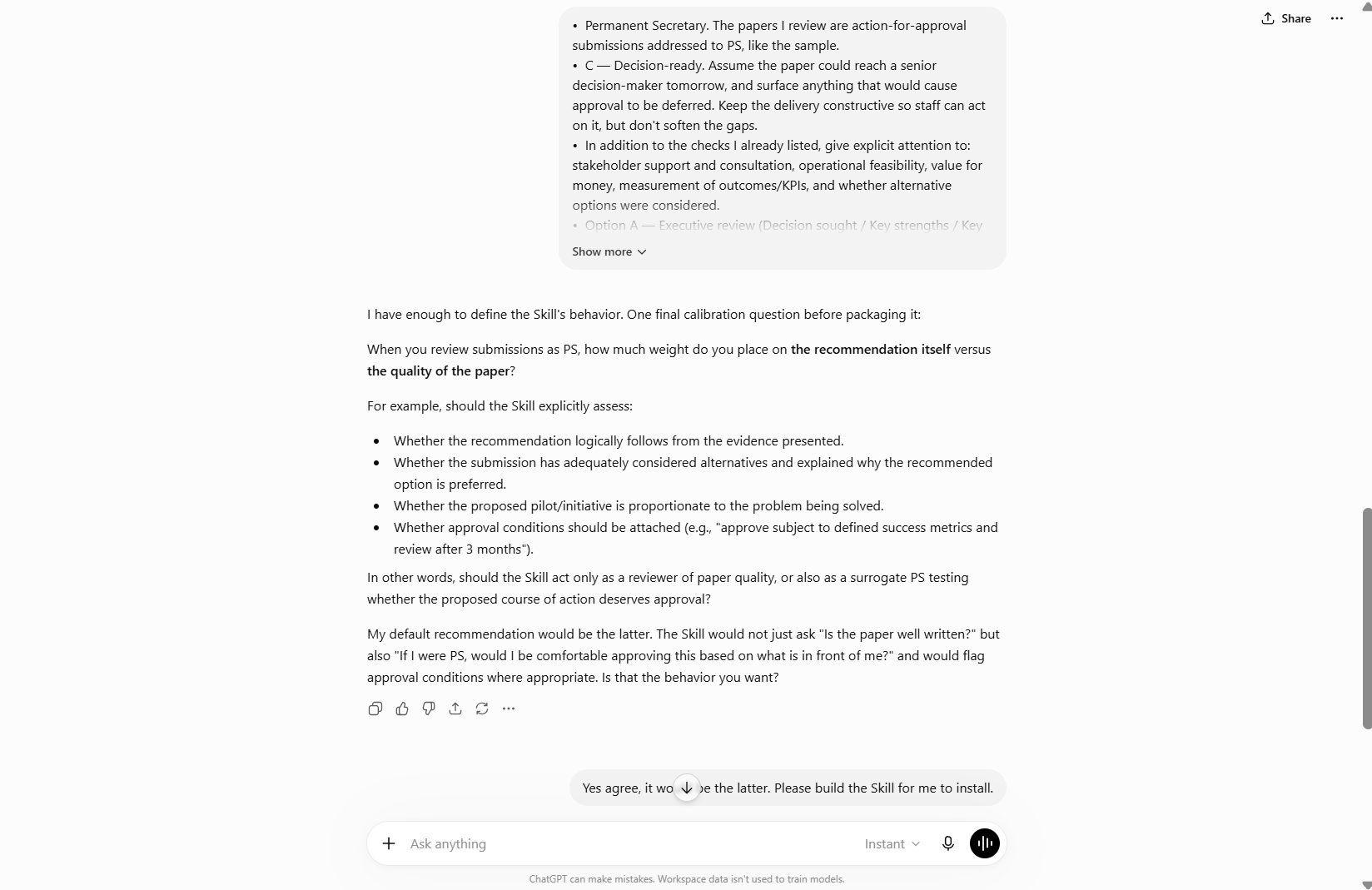
Continue to iterate with ChatGPT
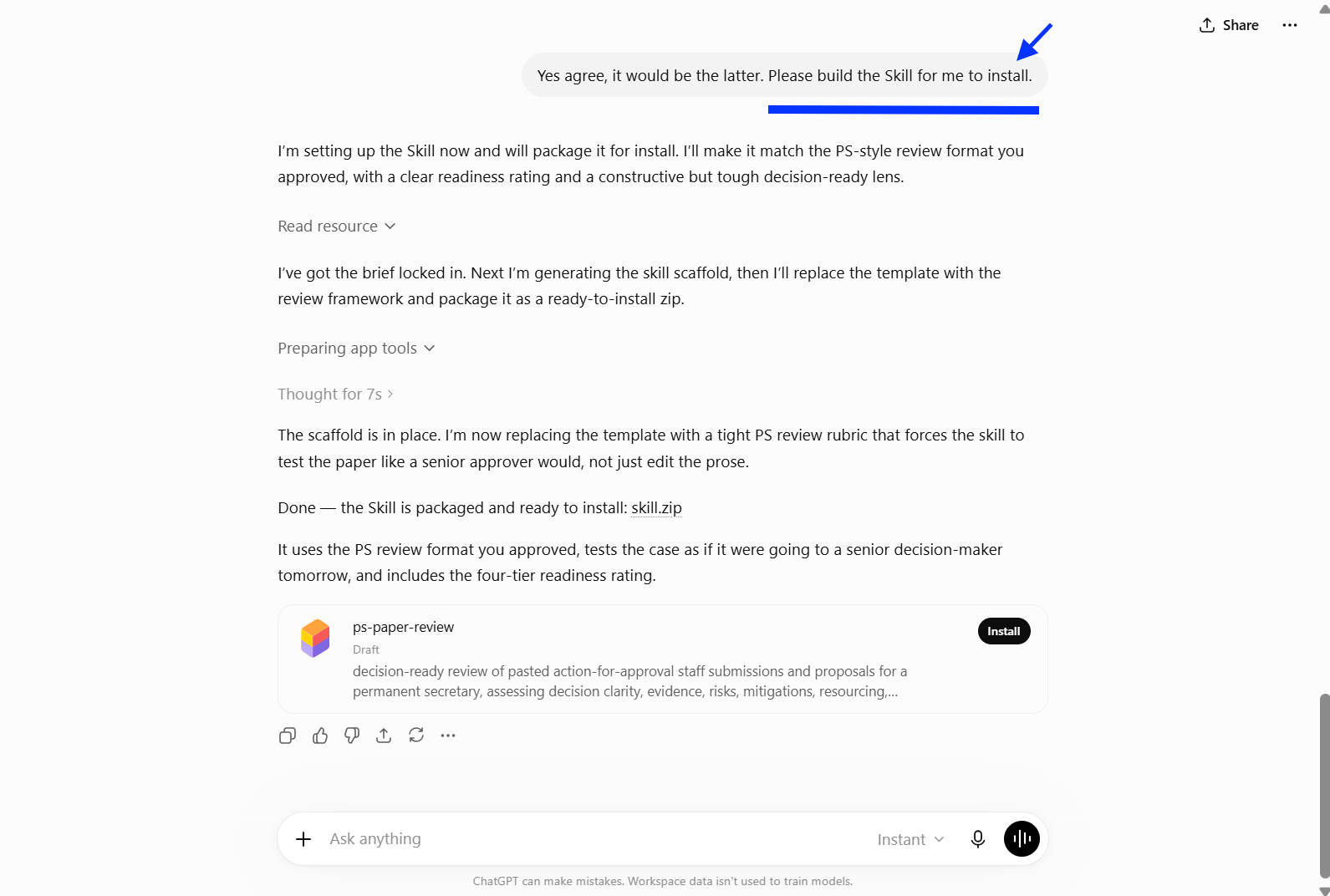
Once you're happy with ChatGPT’s draft Skill ask ChatGPT to build the Skill. Thereafter, install the Skill.
Step 4: Check it. Start a new chat (or click ‘Try in chat’), paste a submission, and ask for feedback.
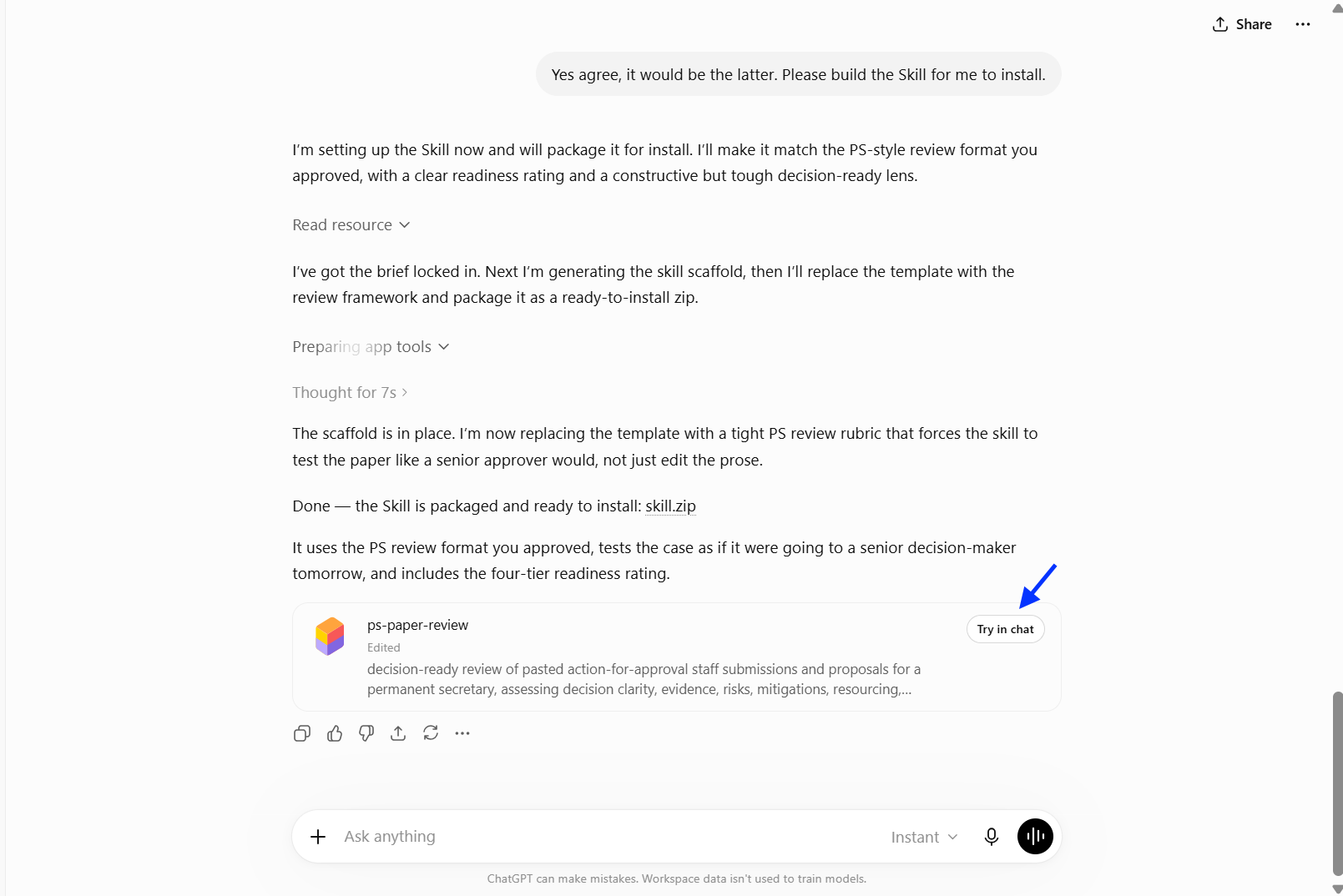
Try skill in a new chat
When you ‘Try in chat’, ChatGPT prepares a sample prompt for you to use to try the Skill. However, we will use our own prompt for this exercise.
Use this sample prompt (but don't send it yet)
Provide first-cut feedback on this. [paste the sample submission from above]
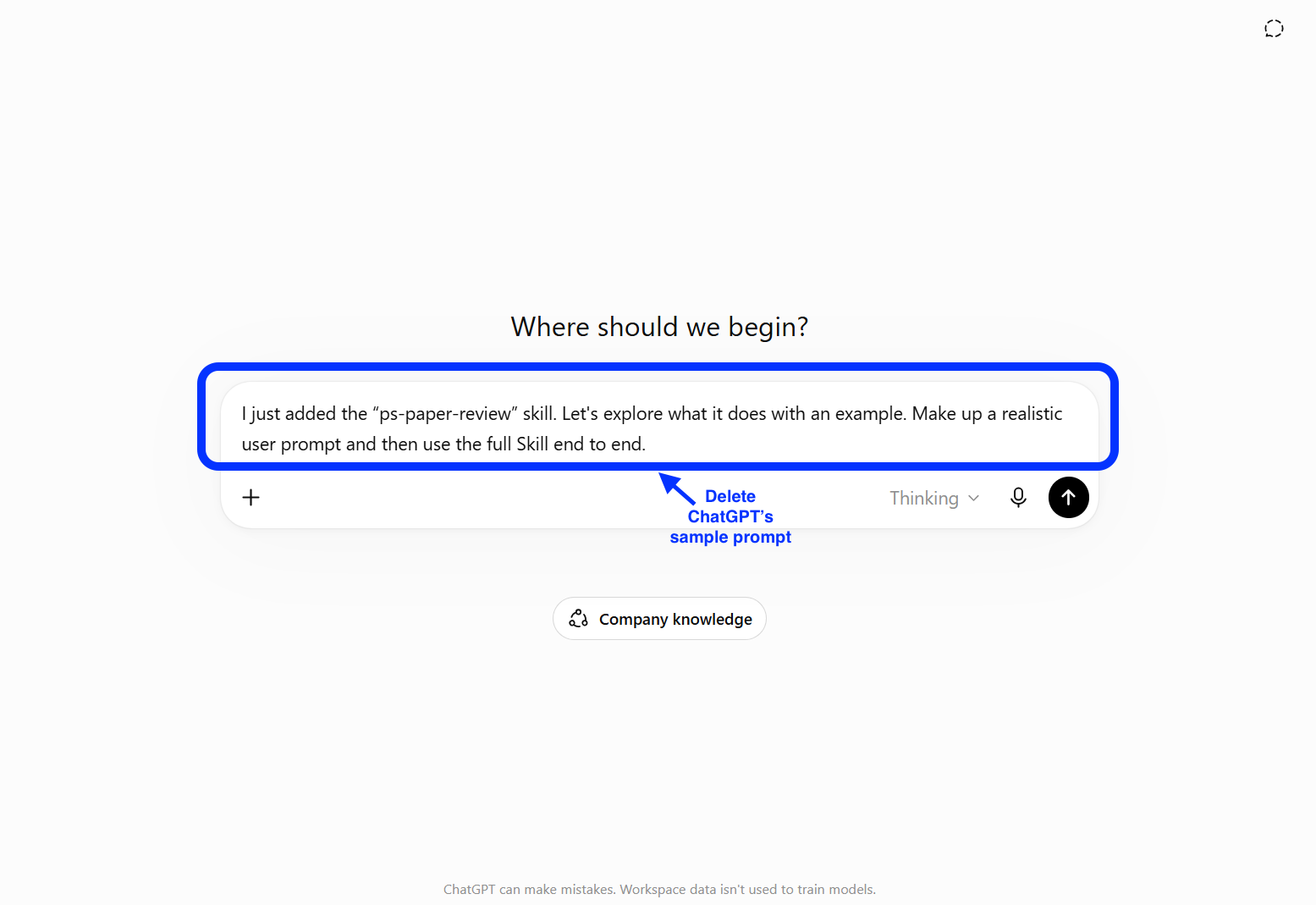
You'd see a default prompt in the prompt box - you can delete it
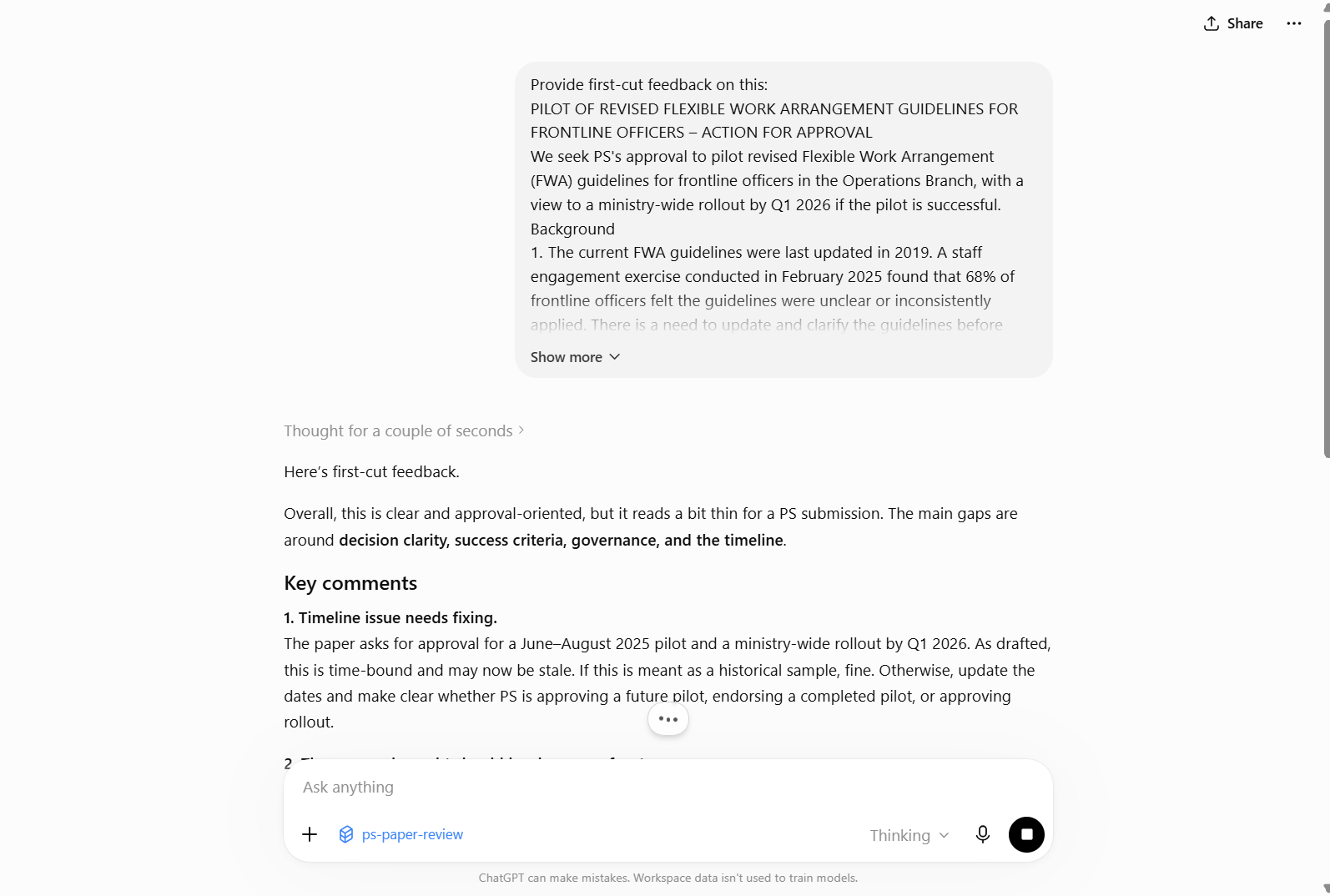
Use the sample prompt + sample submission instead. Paste both in and send.
Step 5: Hand it over.
Go to the Skills homepage, under ‘Plugins’ > 'Skills'.
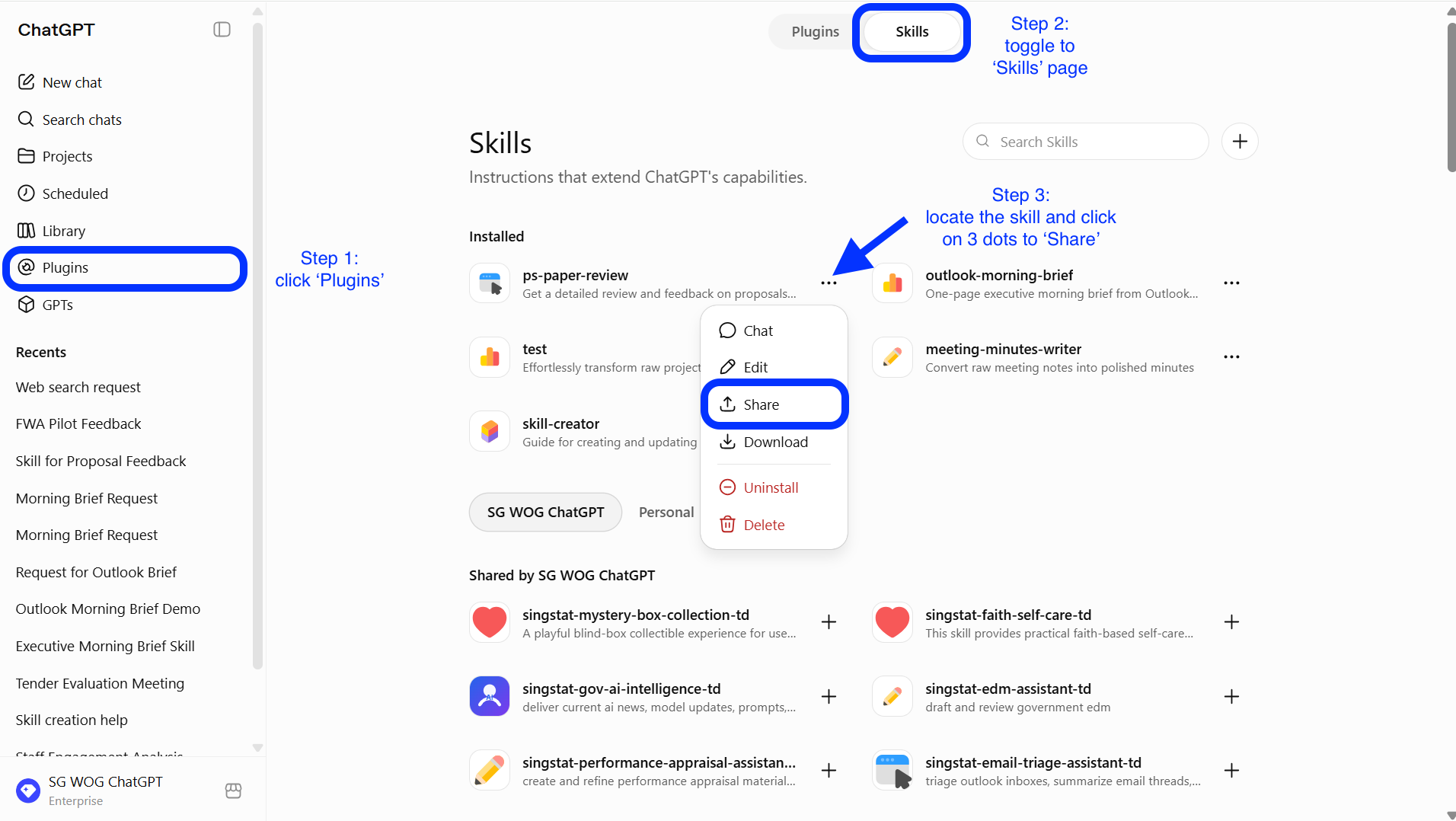
Once you have located your new Skill on the Skills page, click the …, then Share.
What you get
A reusable Skill that gives staff a consistent first-cut review against your priorities.
Drafts that arrive closer to decision-ready, with fewer basic gaps for you to call out.
A shared standard your team can use before any paper reaches you.
Tips
Calibrate with a real paper. The closer your example is to what you actually review, the sharper the Skill's feedback will be. You can always rebuild it later with a better example.
Keep it a first cut, not the verdict. The Skill flags gaps and questions; the judgement and the decision remain yours.
Mind the data. Anonymise any internal information, and always read the Skill's feedback yourself (as a way to test it) before sharing.
Now it's your turn to try!
Take 10 minutes to create a Submission Reviewer.
📂 Prepare a past submission with your inputs. If possible, prepare a set of meeting notes that were already approved to help the AI align the tone and exact format that is expected.
⚡ Review Critically. Make sure that the Reviewer managed to catch all the necessary gaps with a test submission.
🔍 Test and Share. Save the Reviewer as a skill for your team to vet their submissions before they reach you.
With the Reviewer helping you ensure basic gaps are addressed, you can now spend more time providing judgment and guidance, instead of fixing errors.
📚Further Learning: Watch this video on ChatGPT Skills

📅Following the 12-Week Learning Plan?
Congratulations on reaching Week 7! This guide is part of a 12-week learning plan designed to help you build practical AI skills. You're well on your way to becoming AI fluent.

Preview the 12-Week Learning Plan
12 Week Learning Plan
Week 1 | CSDPAI Literacy Module (opens in new tab) |
Week 2 | Webinar: Introduction to AI-First |
Week 3 | Webinar: Open AI ChatGPT Foundations |
Week 4 | Webinar: Introduction to AI-First |
Week 5 | Using AI responsibly |
Week 6 | Meeting Minutes with AI |
Week 7📍 | Generate a Daily Morning Brief |
Week 8 | AI Apply 201: Domain Specific Tasks |
Week 9 | Workflow Mapping & Peer Sharing |
Week 10 | |
Week 11 | Your AI Playbook |
Week 12 | |
Week 13 | CAT Brownbag at Lorong |
↩️Return to: AI 201 Apply Learning Pathway