
AI Apply 201
Ready to put AI to work? Learn how to use AI across the tasks you already do, and build good habits along the way.
Last updated on 12 October 2026
About AI 201: AI 201 is for officers with a basic understanding of AI who are ready to start using it in their daily work.
📝AI 201: Everyday Tasks
AI 201: Everyday Tasks is a practical guide to using AI tools such as ChatGPT and Copilot for everyday work tasks, and connecting with Microsoft 365 tools to work more efficiently.
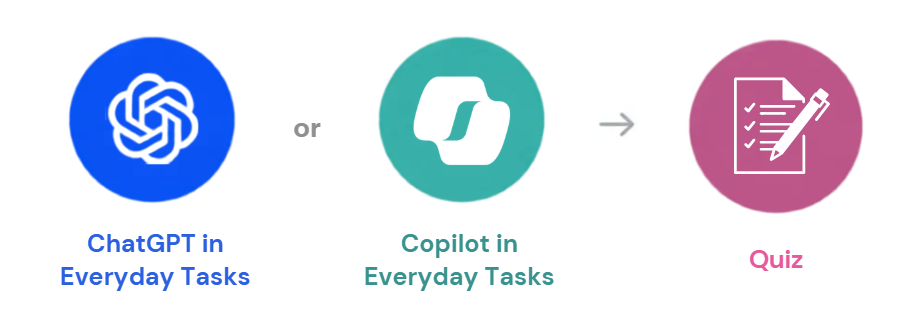
1. ChatGPT in Everyday Tasks⚡
Learn how to build reusable AI workflows with ChatGPT's Skills, Connectors, and Custom GPTs.
Explore these ChatGPT guides for everyday tasks
👉Check out some ready-made skills at Skills Lab (opens in new tab)!
2. Copilot in Everyday Tasks 🤖
Work smarter with Copilot in you Microsoft apps like Word, Excel, and Outlook to accelerate everyday tasks.
Explore these Copilot guides for everyday tasks
3. Quiz📝
Take the AI 201: Everyday Tasks quiz (opens in new tab) to test your knowledge and claim your certificate.
Ready to begin?
Start applying AI to your daily workflows here.
🎯AI 201: Domain-Specific Tasks
AI 201: Domain Specific Tasks helps you apply AI to real workplace tasks in areas such as Communications, Human Resources, and Service Delivery.
Apply AI in your domain specific tasks.
Human Resource | |
Human Resource | |
Communications | |
Communications | |
Service Delivery |
📚Additional Online Resources
OpenAI: Applied AI Foundations [e-Learning 80mins] (opens in new tab)
A practical course on turning multi-step tasks into reusable ChatGPT workflows, covering planning, reasoning, grounding with files and checkpoints, and reviewing outputs. Useful for officers who want to reduce rework, improve output quality, and reuse a clear workflow for recurring tasks.
Learning Microsoft 365 Copilot for Work [e-Learning 50mins] (opens in new tab)*
Learn how to use Microsoft 365 Copilot to draft documents, analyse data, create presentations, summarise emails and meetings, and ask questions across your work files securely.
Microsoft 365 Copilot Quick Tips [e-Learning 1h34mins] (opens in new tab)*
Explore practical Microsoft 365 Copilot features through short (~1-2 minute) videos. Topics include Teams, Outlook, Word, Excel, PowerPoint, OneDrive, SharePoint, Copilot Agents, Loop and OneNote, with real-world examples to help you work more efficiently.
AI Reasoning Models in Practice [e-Learning 40mins] (opens in new tab)*
This course explains how reasoning models differ from traditional GPT models and when to use them. It is useful for learners who want practical hands-on guidance on applying reasoning models to decision-making, code understanding and image-based tasks, while learning how to prompt more effectively and choose the right model for the job.
Advanced Prompt Engineering Techniques [e-Learning 65mins] (opens in new tab)*
A practical course on advanced prompting strategies, covering Chain-of-Thought, Tree-of-Thought and prompt engineering concepts. Useful for officers who want to design more effective prompts and improve AI performance for complex tasks and AI-powered applications.
*LEARN account required
We will continue to review the resources regularly and refresh the materials as new and useful resources, examples, and practices emerge.
🧑🏫Recommended In-Person Courses
Republic Polytechnic: Mastering Prompt Engineering for Generative Artificial Intelligence (AI) ↗(opens in new tab) (opens in new tab)
A 1-day course on crafting, testing and refining effective prompts for generative AI. Through hands-on activities and real-world scenarios, participants learn how prompt design influences AI outputs, apply different prompting techniques across use cases, and evaluate and improve prompts for more relevant and useful results. Recommended for officers who want to strengthen their foundational prompting skills and get more consistent outcomes from generative AI tools.
James Cook University: WSQ Generative AI at Work ↗ (opens in new tab)
An introductory course for professionals new to generative AI, covering the fundamentals of large language models, prompt engineering and practical workplace applications. Participants explore tools such as ChatGPT, Gemini, Copilot, Claude and NotebookLM, alongside use cases in content creation, decision-making and business productivity. Recommended for officers who want a broad foundation in generative AI before progressing to more advanced applications.
We will continue to review the courses regularly and refresh the materials as new and useful resources, examples, and practices emerge.
Explore the rest of our AI pathways

.jpg)
Learn with your team, an hour a week
Follow a practical 12-week learning plan designed for busy teams to learn, experiment and apply AI at work.